
Chrome Extension for Form Analytics
See your form friction — live on your own pages
CRO Pulse is a free Chrome extension for form analytics that overlays real-time conversion data directly onto your web forms — field drop-off rates, hesitation time, error frequency, and revenue impact — without leaving the page. Powered by Eureka, Exatom's AI CRO assistant.
Trusted by leading automotive & e-commerce brands














A Chrome extension for form analytics — projected directly on your form
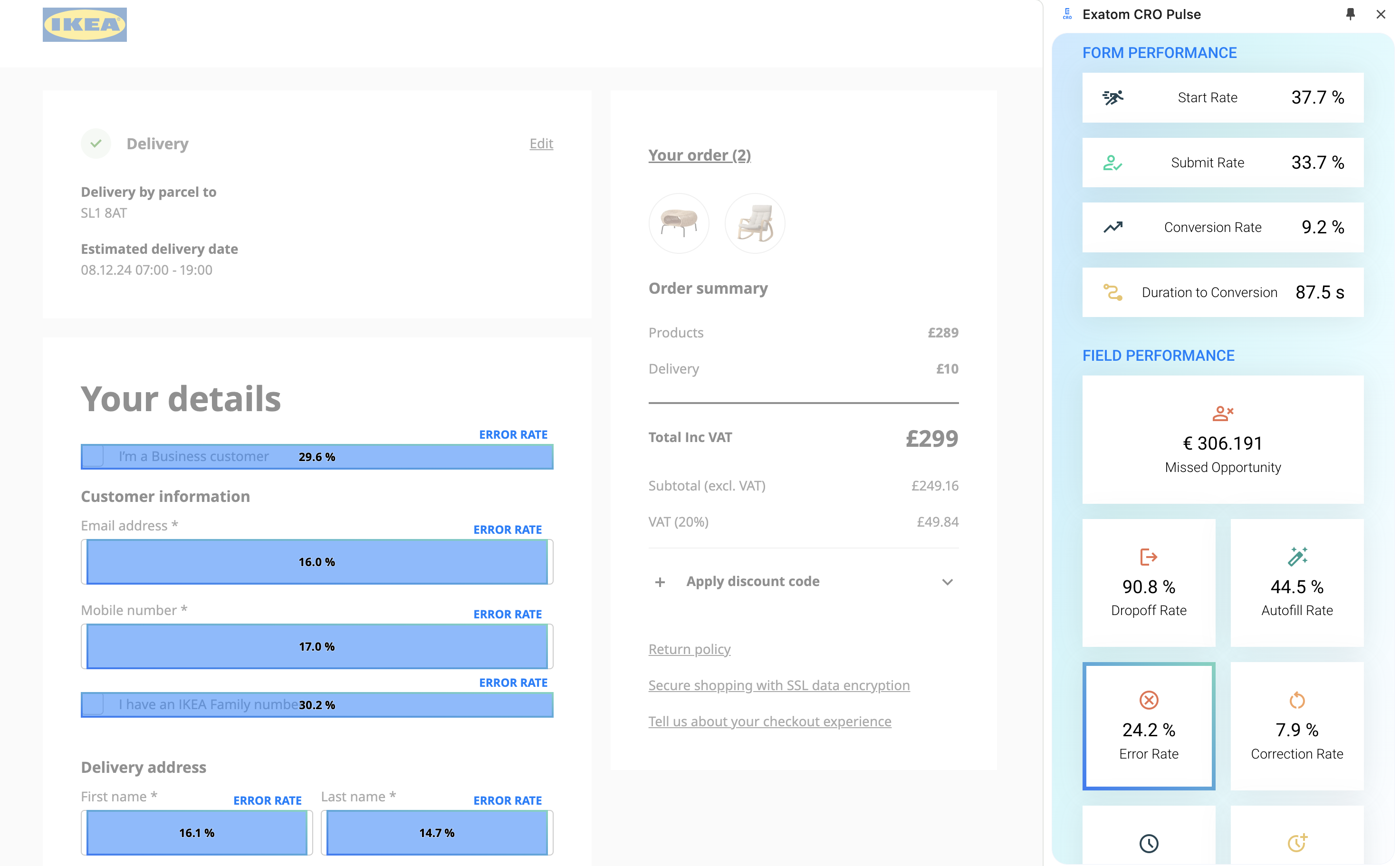
Most analytics tools force you into a separate dashboard. CRO Pulse brings the data to you. This Chrome extension for form analytics opens any page, activates with one click, and shows exactly which fields cause drop-offs, errors, and hesitation — right on the live form.
Whether you're in marketing, analytics, or development, CRO Pulse gives everyone the same field-level picture — in context, without switching tools.
How much revenue is your form friction costing you? Find out with form analytics.
CRO Pulse doesn't just show drop-off rates — it quantifies the revenue impact per field. You instantly know which fix will deliver the highest return, so your team always prioritises the right thing first.
Link directly to Session Replays for any friction point, or jump to Exatom's industry Benchmark Performance — all without leaving the extension panel.

How the CRO Pulse Chrome extension for form analytics works
CRO Pulse works alongside Exatom Form Analytics and Eureka to close the loop between data, observation, and optimisation.
Install in seconds
Add CRO Pulse from the Chrome Web Store, pin it to your toolbar, and navigate to any page with the Exatom tag active.
Analytics appear on the form
Field drop-off rates, error frequency, hesitation time, and revenue impact are overlaid directly on each form element.
Eureka surfaces your wins
Exatom's AI CRO assistant flags the highest-impact friction points and recommends exactly what to fix — and why.
Share with one click
Screenshot your annotated form, link to Session Replays, or compare against Benchmark Performance — all from the panel.
Share insights instantly — without leaving the page
The Tools & Links panel puts everything your team needs in one place. Screenshot the annotated form, share it in Slack or PowerPoint, or link directly to Session Replays and Benchmark Performance.
CRO Pulse automatically detects all active forms on your site — including forms spread across multiple pages — so every stakeholder sees the same picture, in context.

Try the Chrome extension for form analytics on your own site — free, no account needed
Not yet an Exatom customer? Install CRO Pulse and hit the DEMO button. You'll see exactly how this Chrome extension for form analytics visualises friction on your own live pages — field drop-offs, error rates, hesitation time, and revenue impact — with zero setup.
When you're ready to unlock the full picture — with real visitor data, Eureka AI analysis, and benchmark comparisons — just activate your free trial in seconds.

Everything you need to stop guessing and start knowing
Live overlay — no dashboards
Analytics are projected directly on the form. Switch between views without leaving the page you're analysing.
Real-time hesitation data
See exactly how long visitors pause on each field — a leading signal for friction you can act on immediately.
Revenue impact per field
CRO Pulse quantifies how much revenue each friction point costs — so you always fix the highest-value issue first.
Session Replay — one click
Jump straight from the field overlay to the Session Replay for that exact friction point. No copy-pasting IDs.
Benchmark comparison
Compare your form metrics against Exatom's industry benchmarks — automotive, e-commerce, insurance, and more.
Cookieless & GDPR-safe
Only anonymised and aggregated data is shown. No personal data is captured — ISO 27001 certified.
Start seeing your form friction in 60 seconds
Install CRO Pulse, activate on any page, and discover exactly where visitors drop off — and how much it's costing you. Free, forever included with Exatom Form Analytics.
Frequently asked questions about CRO Pulse
Everything you need to know about CRO Pulse by Exatom. Still have questions?